Nirav
·
·
2 min
Turn Table Mode Is Here. 3D Capture Just Got Easier.
We heard you.
Capturing 3D dishes with walk around mode was awkward. You had to move around the table, bend at strange angles, make sure lighting did not change, and try to keep the frame consistent for 30-40 shots. It worked, but it was not easy. And definitely not comfortable.
So we built something better.
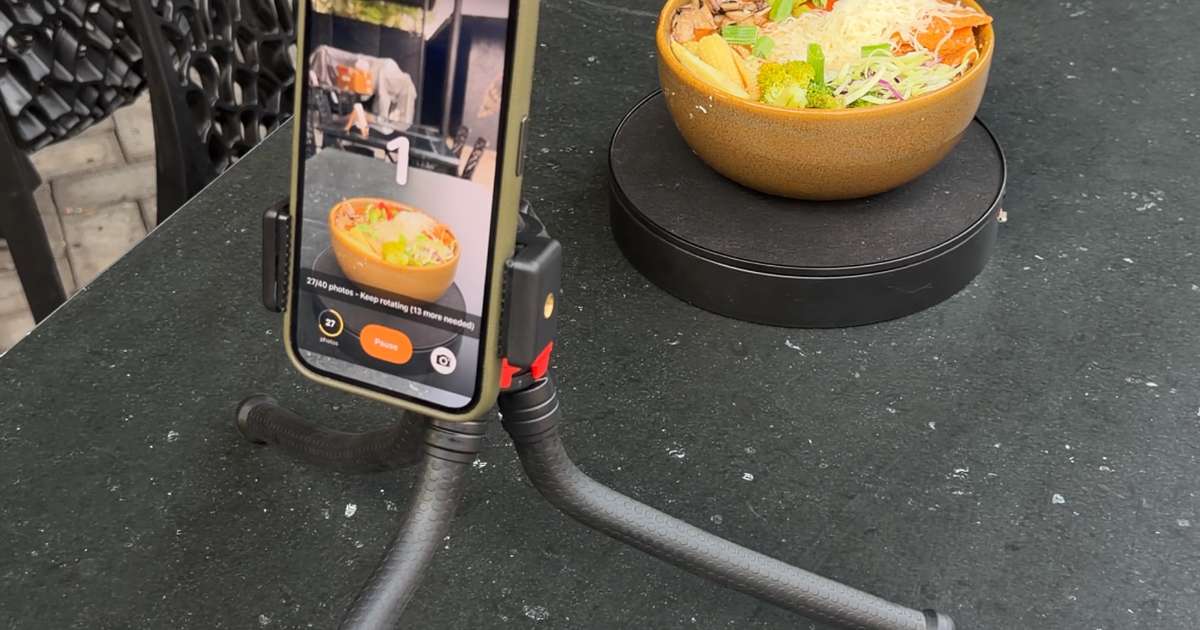
Turn Table Mode lets the food move while your camera stays still. No circling. No back pain. No uneven angles because your hand shifted slightly between shots.
If this does not make 3D capture easier, we honestly do not know what will.
So we built something better.
Turn Table Mode lets the food move while your camera stays still. No circling. No back pain. No uneven angles because your hand shifted slightly between shots.
If this does not make 3D capture easier, we honestly do not know what will.
So what do you need for this?
- A rotating turntable. A simple self rotating platform is enough. Place the dish in the center and let it rotate smoothly. Some version of lazy suzy that you can find on your local Amazon.
- A fixed camera holder. Mount your phone on a tripod or stable holder. The app captures 40 images at the same angle while the dish rotates.
- A still backdrop. A clean wall or simple background works. Just keep it consistent across all shots.

Why is this a big step?
Walk around mode depended on humans moving perfectly around an object. That is hard to repeat consistently inside a real kitchen or restaurant setting.
Walk around mode depended on humans moving perfectly around an object. That is hard to repeat consistently inside a real kitchen or restaurant setting.
Turn Table Mode simplifies everything. The camera stays fixed. The background stays fixed. Lighting stays stable. Only the dish rotates.
The result is noticeably better. Cleaner geometry. Sharper textures. More reliable 3D models.
For us, this is a major milestone. 3D capture was always powerful, but now it finally feels practical for everyday restaurant teams.
Update your app to the latest version to get the turn table mode and start using it today. We cannot wait to see what you create with this.
Cheers!
Cheers!